Figuring Out Which Device Was Forcibly Waking My PC
For a while I’ve had an issue where hibernating my computer would instantly wake it back up. However, hibernating it again from the login screen would be successful. I come back around to this issue every month or so and usually give up as most solutions are “don’t allow any device to wake the computer.” I like being able to jiggle my mouse or press a key to wake my computer so I didn’t really want to go this route.
I wanted to believe that every time I pressed hibernate and got up from my chair, I imperceptibly bumped the mouse and that was the issue. It turns out that the issue was my Adafruit Macropad.
The Issue
Usually after hibernating, my macropad screen shows the REPL erroring out. I’m not sure why exactly, but I think it has something to do with how the CircuitPython HID libraries interact with Windows; If there no PC to communicate with, emulating the HID fails for some reason or another.
During the first failed hibernate, the macropad must be doing some HID related things that cause the PC to wake up. When successfully hibernating from the login screen, my macropad is still errored out on the REPL as I usually don’t reset it in this situation.
The Solution
The solution then is to disallow the macropad from waking the computer. However, this is what my device manager looks like for my keyboards and mice. I should probably figure out if I can clean this up at some point.
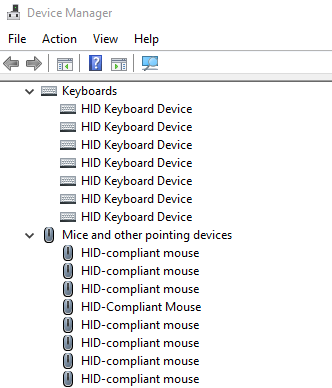
My first thought was that I didnt want to individually enable and disable wake for each device and hibernate in between each iteration. I found a post on Stack Exchange that advised matching the hardware ID numbers to the suspect device. The USB Vendor ID (VID) for Adafruit products is 0x239A. Checking each device’s hardware IDs turned out to be very quick compared to going through 10+ hibernate cycles.
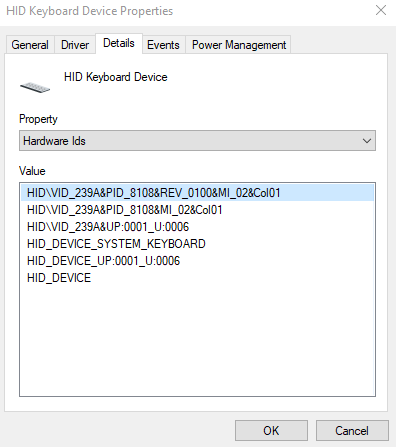
If you are having a similar problem and can identify which device is waking your computer, this may be a usable solution. I had a pretty obvious clue however (the REPL showing on the integrated display). If you have a microcontroller acting as an HID, try starting there first. My macropad emulates both a mouse and keyboard, so I disabled allow wake for both. My minor problem is now solved.
There are other ways to identify the problem device, such as the event viewer or using the CMD command powercfg -devicequery wake_armed. These both didn’t work out for me though, as the event viewer wake source shows “unknown,” and the CMD command gave me a vague list of USB devices. Best of luck if you need it.